Field Supervisor+ Plan
Material
Tickets
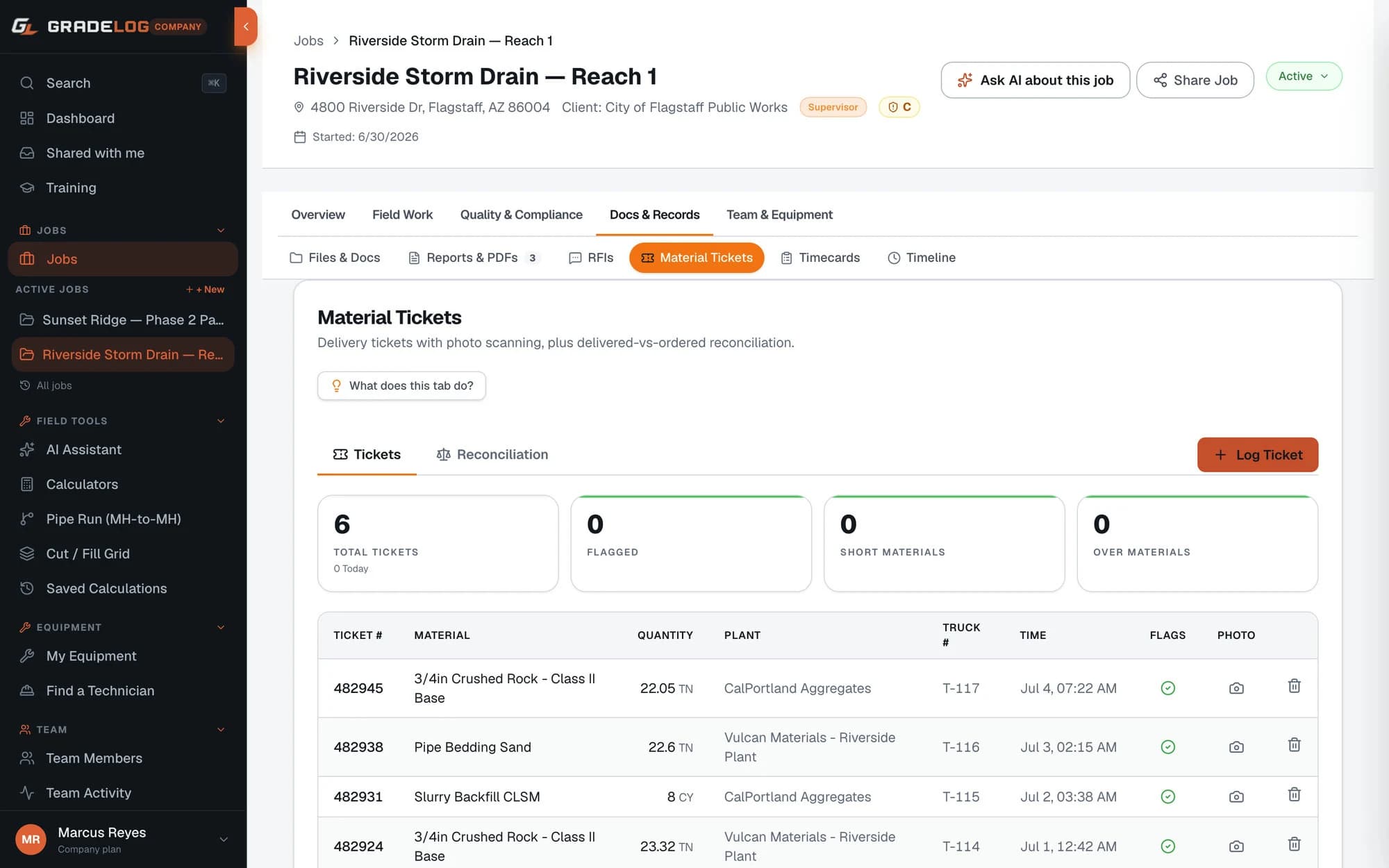
Log every delivery ticket per job — concrete, asphalt, aggregate. Photo the ticket, OCR pulls the numbers, and your CY and tonnage totals update automatically.
What it does
Full ticket logging
- Ticket number, material type, quantity, unit
- Mix design and plant name
- Truck number and driver name
- Ticket time and delivery timestamp
OCR photo scanning
- Photo the delivery ticket in the field
- OCR extracts ticket number, quantity, plant, truck
- Review and confirm before saving
- Photo stored with the entry for audit trail
Auto-totals per job
- Total CY placed — running tally
- Total tons placed — running tally
- Today's ticket count vs all-time
- Filter by material type
How it works
01
Receive the delivery ticket
When the truck arrives, open the Material Tickets tab on your job.
02
Photo or enter manually
Photograph the ticket — OCR fills the fields. Or enter manually. Takes under 30 seconds.
03
Confirm and save
Review the pre-filled fields, adjust anything the OCR missed, and save. The ticket is logged.
04
See your totals
Running CY and tonnage totals update instantly. Review your full ticket log at any time.
Who uses this
Concrete foremen
Log every truck on a pour day in seconds. Your total CY placed is accurate by end of shift — no adding up paper tickets tonight.
Grading superintendents
Track aggregate and base material deliveries against the job's material budget. Know exactly what's been placed before the inspector asks.
Project managers
Material quantities on every job, in one place. Verify pay application quantities against your logged delivery tickets.
Across every project type
From concrete pour days to aggregate hauls, material tracking is critical across all site-work trades.
Common questions
What material types can I log delivery tickets for?
Gradelog supports concrete, asphalt, aggregate, pipe, and other. Each ticket is categorized so CY and tonnage totals are tracked separately by material type.
How does OCR ticket scanning work?
Photo the delivery ticket with your phone. Gradelog's OCR reads the ticket number, quantity, plant name, and truck number automatically and pre-fills the form. You review and confirm before saving.
Are material tickets per job or per company?
Material tickets are scoped per job. Each job maintains its own ticket log with totals — total CY, total tons, and today's count — shown on the job dashboard.
Can I attach a photo of the delivery ticket?
Yes. Every delivery ticket entry supports a photo attachment. This creates a paper trail that matches your digital log — useful for pay application disputes or material quantity audits.
Can material ticket data be used in pay applications?
Yes. The material ticket log provides a date-stamped, quantity-verified record of every delivery. PMs use the summary totals (CY, tons by material type) to back up quantities in pay applications — especially for concrete and aggregate.
Every ticket.
Accounted for.
Free plan available. Cancel anytime.
Get StartedFree plan availableNo card to startCancel anytime