Company+ Plan
Production
Log
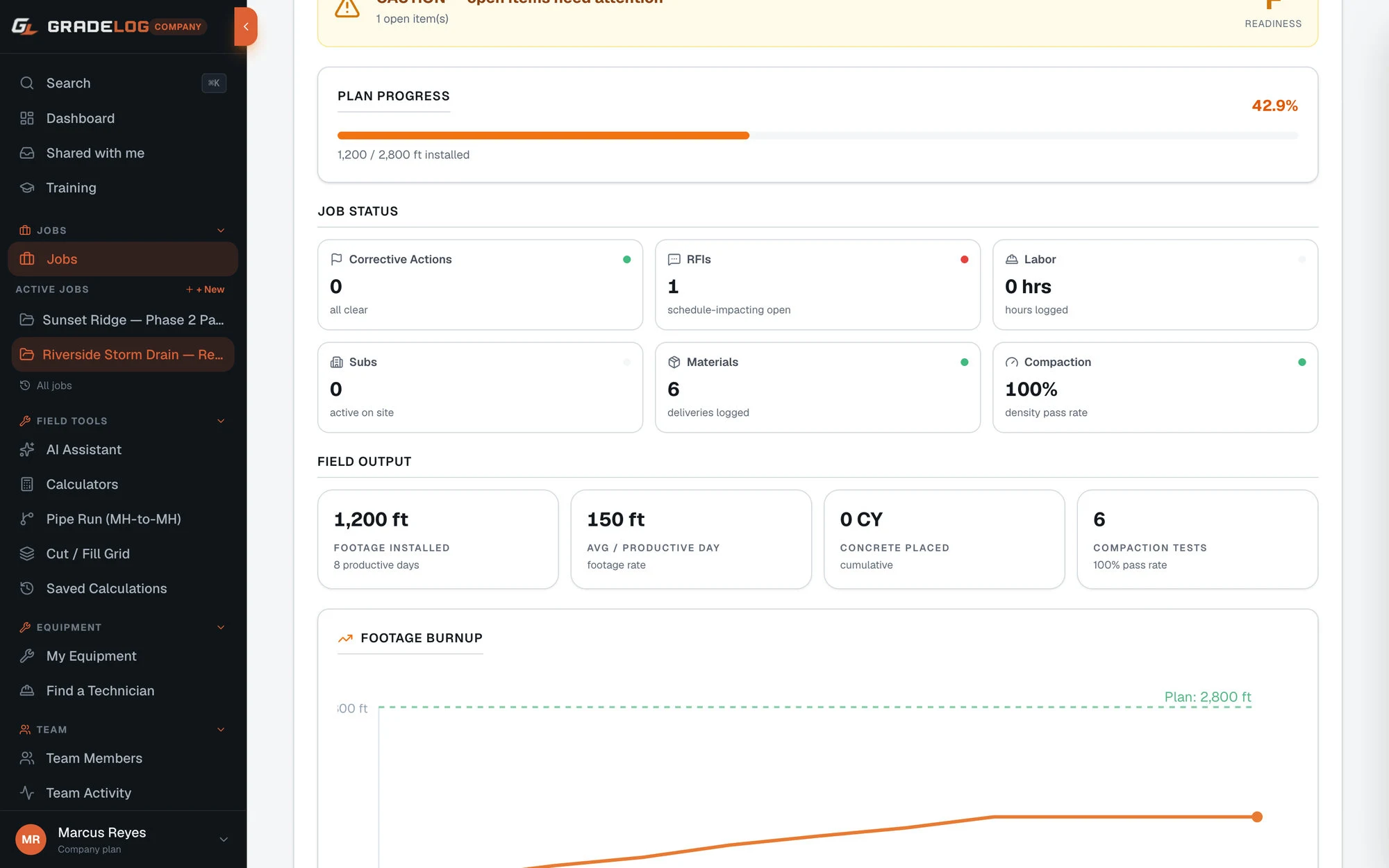
Log daily quantities against your bid. Gradelog auto-calculates your pace, flags underperformance, and shows a burnup chart — so you know if you're making money before the job ends.
What it does
Daily quantity logging
- CY, tons, LF, SF, EA — per entry
- Material type: concrete, asphalt, earthwork, aggregate, pipe
- Station start and end per entry
- Description field for work area detail
Bid vs actual tracking
- Enter bid quantity at job setup
- Cumulative placed quantity auto-calculated
- Percent complete shown continuously
- Required daily rate = bid qty / remaining days
Performance analytics
- 7-day rolling average production
- Underperformance flagged when below required daily rate
- Burnup chart: cumulative progress over time
- Entry count and totals per material type
How it works
01
Set your bid quantity
Enter the bid quantity and unit for the job — the total CY, tons, or LF you're contracted to place.
02
Log daily quantities
Each day, enter how much was placed, what material type, and which stations. Takes under a minute.
03
Watch the burnup
Gradelog plots your cumulative quantity against the bid. You see percent complete and whether you're ahead or behind pace.
04
Respond to flags
If your daily rate drops below required pace, the flag appears. Adjust crew, equipment, or schedule before the job goes over.
Who uses this
Project managers
Daily visibility into production pace without relying on foreman estimates. Know where you are against bid before Friday's meeting.
Company owners
Across all jobs, see which ones are running behind bid and which are ahead. Allocate resources to where they're needed most.
Superintendents
Log quantities at end of shift and see immediately whether the day's production kept pace with the required rate.
Built for high-volume earthwork
Production tracking matters most when you have thousands of CY moving every day and a schedule to hit.
Common questions
What units does the production log support?
Gradelog tracks production in CY (cubic yards), tons, LF (linear feet), SF (square feet), and EA (each). Each entry is assigned a unit — totals are kept separate by unit type.
How does underperformance flagging work?
You enter your bid quantity and remaining project days. Gradelog calculates the required daily rate. When your rolling production average falls below that rate, the dashboard flags it so you can adjust before the schedule slips.
Can I track multiple material types on the same job?
Yes. Each production log entry is tagged with a material type — concrete, asphalt, earthwork, aggregate, pipe, or other. Totals and burnup charts can be filtered by material type.
Which plan includes the production log?
The Production Log is available on the Company plan ($249/mo, 5 seats) and Enterprise plan ($499/mo). It is not available on Field Pro or Field Supervisor plans.
How does the burnup chart work?
The burnup chart plots your cumulative quantity placed over time against the bid quantity. It shows at a glance whether you're ahead of, on, or behind the pace required to complete by your target end date. Each day's entry adds a data point to the trend line.
Know your numbers.
Every day.
Free plan available. Cancel anytime.
Get StartedFree plan availableNo card to startCancel anytime